
Partners ·
Deepfake detection for AI agents: Scam AI × Aident
Scam AI × Aident: an AI agent checks the photos, video and recordings in a claim for AI generation before relying on them, and a person reviews what is flagged.

By Xingyu (Alex) Shen, Founding Engineer, Scam AI
Scam AI and Aident show how an AI agent can check the photos, videos and recordings in a case before it relies on them. Aident Loadout lets the agent open the apps that hold the case, under the team's policies. Scam AI checks each supported media file for signs of AI generation or manipulation. The claims team makes the final decision.
An agent can summarize an insurance claim in minutes, but it takes every photo and video in the packet at face value. If one was generated or edited, the agent may rely on it in both its summary and its recommendation. Insurance fraud costs American consumers at least $308.6 billion a year, by the Coalition Against Insurance Fraud's count (CAIF).
The workflow needs both halves. An agent that cannot reach the case has nothing to check, and one that reaches it without checking passes generated media straight into its brief. We call the joint workflow Verify Before You Act.
Below, a synthetic claim packet shows real detection results for a sample photo and video, run on our production API. The brief around those results shows how the agent routes them; it illustrates the workflow rather than recording a full Loadout run.
At a glance
- Who: Scam AI checks images, video and audio for AI generation and manipulation; Aident Loadout governs which apps and credentials an agent may use.
- The use case: before an agent summarizes a claim or recommends a next step, it checks the supported media in the packet, and a person reviews anything flagged.
- The split: Loadout governs how the agent reaches the case, Scam AI checks each file, and a person on the team decides.
- The demo: a synthetic claim packet; both media files were flagged on our production API, and the raw detection output is linked below.
- Available today: the Scam AI MCP server with its starter Skill, and Aident Loadout. We set up the joint workflow with each team.
A sample claim, checked file by file
Sample case, synthetic files, not a real claim. The packet holds an AI-generated photo of the insured shop front, an eight-second clip made from one of our AI-generated faces, and a repair-estimate PDF.
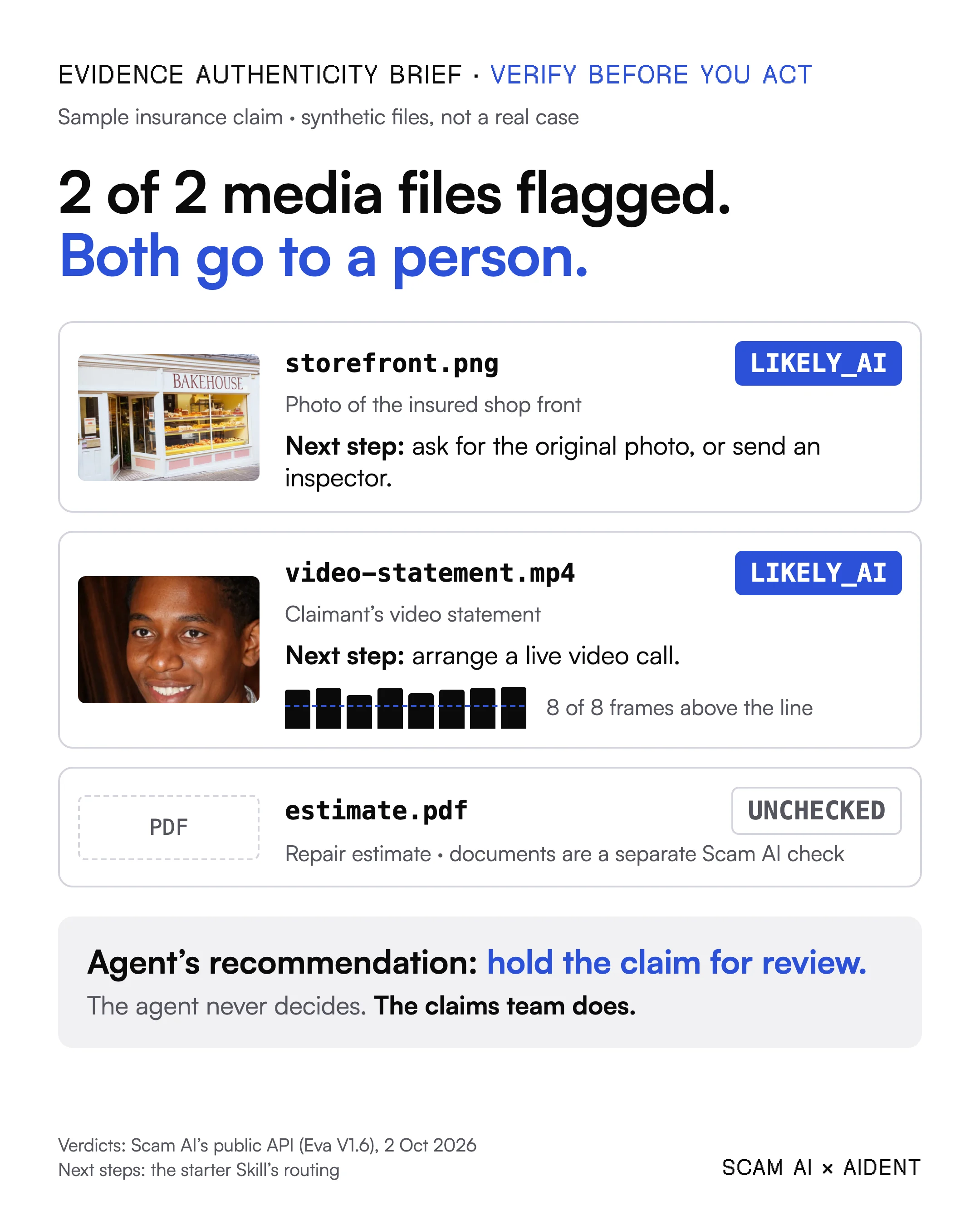
The verdicts are real results from Scam AI's public API on 2 October 2026 (UTC); the next steps show how the starter Skill routes them.
Both media files came back LIKELY_AI, and all eight scored frames of the clip sat above the threshold. The API returned the same verdict and one-sentence summary that the MCP tool gives an agent.
Under the Skill, each flagged file gets a next step: ask for the original photo or send an inspector, and arrange a live video call with the claimant. The repair estimate stays unchecked, because this check covers images, video and audio only. Document forgery detection is a separate Scam AI plan, and our TinyFish claims review shows that side.
Raw detection output and provenance: photo result, video result, how the samples were made.
How Verify Before You Act runs
- The team opens the case and gives the agent its review criteria.
- The agent gathers the files through Aident Loadout, reading the case from the team's apps without seeing a raw credential.
- Scam AI checks each media file. One
detect_mediacall returns a verdict, a score and a one-sentence summary. - The agent writes the brief, following a Skill: one rule per verdict, one line per file, and the reason each flagged file needs a person.
- The team decides. A person reads the brief, asks for what is missing and makes the call.
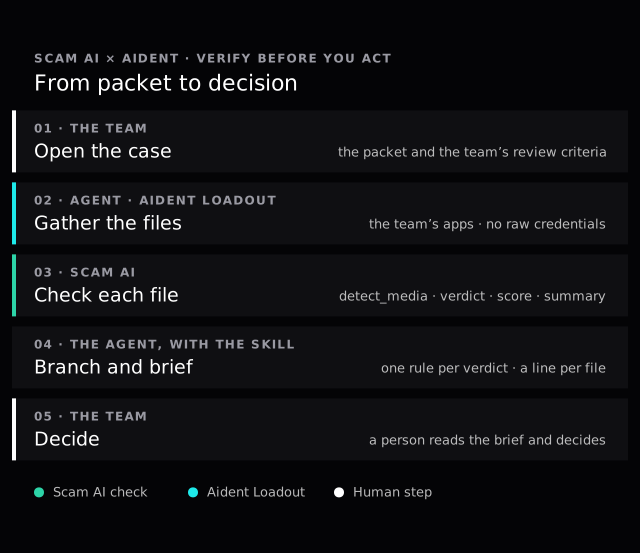
Cyan is Aident Loadout, teal is Scam AI's check, and white is the team's own steps.
How to use a deepfake-detection MCP server in an AI agent
MCP, the Model Context Protocol, is an open standard that lets an agent call real tools. Connecting Scam AI takes one config entry: the agent's MCP client points at https://mcp.scam.ai/mcp with an API key in the x-api-key header, or runs npx -y @scam-ai/mcp-server locally. Either way a check costs the same as a direct API call (MCP & Skills).
The agent then calls detect_media once per file, with a link or the file's bytes, or a local path when the server runs on the agent's machine. The tool accepts images, video and audio and works out which it received.
Our MCP page also publishes a starter Skill, verify-media-before-acting, a short instruction file with one rule per answer. It continues on LIKELY_REAL, lists ALERT for human review, escalates LIKELY_AI and treats a failed call as unchecked. Written into a Skill, the rule loads with every task instead of depending on how someone phrased the request.
Where Aident Loadout fits
Loadout gives agents the integrations, credentials, policies and audit trail they need without handing them raw provider credentials (Loadout overview). API keys sit in an admin-managed Vault, and the audit shows each action with its status and the credits it used (Vault and Audit).
In Verify Before You Act, Loadout is how the agent reaches the claim inbox or shared drive where the packet sits, under the team's policies. In this walkthrough, Loadout and Scam AI's MCP server are two connections in the same agent. Scam AI checks media for signs of AI generation or manipulation; Loadout governs what the agent may access.
What does the agent get back for each file?
Every answer carries a verdict to route on, a score for the probability that the file is AI-generated or manipulated, and a one-sentence summary (reading the result). The score is not a confidence level, and it is not proof (MCP & Skills). A video adds a per-frame series: about one frame a second up to 20 seconds, and 20 frames across a longer clip. Audio adds scored windows and answers only LIKELY_REAL or LIKELY_AI.
A failed check is also an answer: the server returns one of 13 stable error codes, so the agent branches on the code, never on the wording (package reference).
unprocessable_media is never charged, and the brief lists that file as unchecked. After a timeout the check may have run and been charged, so the agent reads get_usage before resending. An unchecked file stays unchecked; it never becomes a clear result.
The same check in lending, onboarding and hiring
Claims are the first example, not the only one. A lending agent can check the selfie or ID video in a loan application before it scores the file. An onboarding agent can route KYC selfies by the same three verdicts. A recruiting agent can check a recorded interview before it summarizes the candidate for a hiring panel.
Setting it up for a claims team
The Scam AI MCP server and its starter Skill are live on our MCP page, and Aident Loadout is live. A team brings its review policy for the Skill's rules, the apps Loadout may open, and a place to hold the key. Our insurance claims page describes the review this flow feeds.
FAQ
How do I use a deepfake-detection MCP server in an AI agent? Add the server to the agent's MCP configuration and call detect_media once per file. Then give the agent one rule per verdict in a Skill: continue on LIKELY_REAL, send ALERT to a person, and block or escalate LIKELY_AI.
Does the agent decide whether a claim is fraudulent? No: Scam AI reports a probability about each file, the brief sorts the results, and the claims team decides.
Which files can the Scam AI MCP server check? Images up to 10 MB, video up to 100 MB and audio up to 50 MB, or a link to a public video page or media file. Document forgery detection is a separate plan.
What does a check cost? One credit per image, per scored video frame up to 20 a clip, and per started minute of audio, at $0.02 a credit. New accounts start with 100 credits (MCP & Skills).
Agents that act on files customers send in should check them first. Contact us to integrate the Scam AI MCP server and starter Skill into your agent workflow.
Learn more about Aident: Aident Loadout · Loadout documentation
Scam AI × Aident · 2026